Input endpoint
In DryWetMIDI an input MIDI endpoint is represented by the IInputEndpoint interface. It allows to receive events from a MIDI device. To understand what an input MIDI endpoint is in DryWetMIDI, please read the Overview article.
The library provides built-in implementation of IInputEndpoint: InputEndpoint class. To get an instance of InputEndpoint you can use GetByName static method. ID of a MIDI endpoint is a number from 0 to endpoints count minus one. To get count of input MIDI endpoints presented in the system there is the GetEndpointsCount method. You can get all input MIDI endpoints with the GetAll method.
Warning
You can use InputEndpoint built-in implementation of IInputEndpoint only on the systems listed in the Supported OS article. Of course you can create your own implementation of IInputEndpoint as described in the Custom input endpoint section below.
After an instance of InputEndpoint is obtained, call StartEventsListening to start listening to incoming MIDI events going from an input MIDI device. If you don't need to listen for events anymore, call StopEventsListening. Also this method will be called automatically on Dispose. To check whether InputEndpoint is currently listening for events or not use IsListeningForEvents property.
If an input device is listening for events, it will fire the EventReceived event for each incoming MIDI event. Received MIDI event will be passed to an event's handler.
Warning
If you use an instance of the InputEndpoint within a using block, you need to be very careful. In general it's not a good practice and can cause problems. For example, with this code
using (var inputEndpoint = InputEndpoint.GetByName("Some MIDI device"))
{
    inputEndpoint.EventReceived += OnEventReceived;
    inputEndpoint.StartEventsListening();
}

// ...

private static void OnEventReceived(object? sender, MidiEventReceivedEventArgs e)
{
    // ...
}
the OnEventReceived method will not be probably called at all since the program leaves the using block before any event is received, and thus the device instance will be destroyed and not functioning of course.
Small example (console app) that shows receiving MIDI data:
using System;
using Melanchall.DryWetMidi.Multimedia;

namespace InputEndpointExample
{
    class Program
    {
        private static IInputEndpoint _inputEndpoint;

        static void Main(string[] args)
        {
            _inputEndpoint = InputEndpoint.GetByName("Some MIDI device");
            _inputEndpoint.EventReceived += OnEventReceived;
            _inputEndpoint.StartEventsListening();

            Console.WriteLine("Input device is listening for events. Press any key to exit...");
            Console.ReadKey();

            (_inputEndpoint as IDisposable)?.Dispose();
        }

        private static void OnEventReceived(object sender, MidiEventReceivedEventArgs e)
        {
            var midiEndpoint = (MidiEndpoint)sender;
            Console.WriteLine($"Event received from '{midiEndpoint.Name}' at {DateTime.Now}: {e.Event}");
        }
    }
}
Warning
You must always take care about disposing an InputEndpoint, so use it inside using block or call Dispose manually. Without it all resources taken by the endpoint will live until GC collects them via the finalizer of the InputEndpoint. It means that sometimes you will not be able to use different instances of the same endpoint across multiple applications or different pieces of a program.
InputEndpoint has the MidiTimeCodeReceived event which, by default, will be fired only when all MIDI Time Code components (separate MidiTimeCodeEvent events) are received forming hours:minutes:seconds:frames timestamp. You can turn this behavior off by setting RaiseMidiTimeCodeReceived to false.
If an invalid channel, system common or system real-time or system exclusive event received, ErrorOccurred event will be fired with the Data property of the exception filled with information about the error.
Custom input endpoint
You can create your own input endpoint implementation and use it in your app. For example, let's create an endpoint that will listen for specific keyboard keys and report corresponding notes via the EventReceived event. Also we will control the current octave with up arrow and down arrow keys increasing or decreasing octave number correspondingly. Following image shows the scheme of our endpoint:
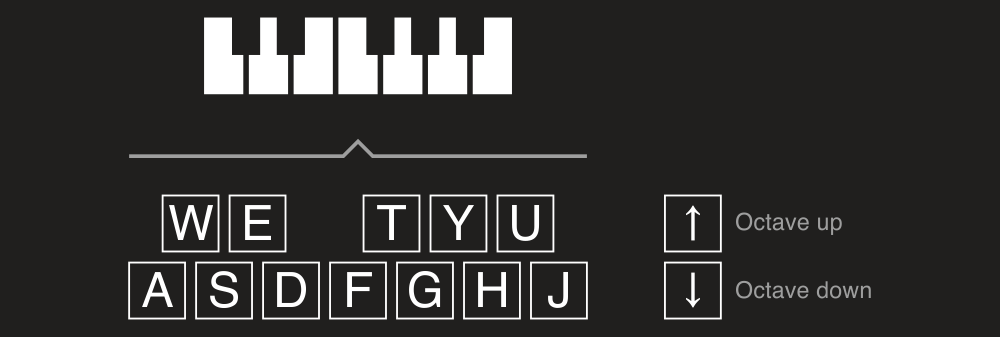
Now we implement it:
public sealed class KeyboardInputEndpoint : IInputEndpoint
{
    public event EventHandler<MidiEventReceivedEventArgs> EventReceived;

    private static readonly Dictionary<ConsoleKey, NoteName> NotesNames = new Dictionary<ConsoleKey, NoteName>
    {
        [ConsoleKey.A] = NoteName.C,
        [ConsoleKey.W] = NoteName.CSharp,
        [ConsoleKey.S] = NoteName.D,
        [ConsoleKey.E] = NoteName.DSharp,
        [ConsoleKey.D] = NoteName.E,
        [ConsoleKey.F] = NoteName.F,
        [ConsoleKey.T] = NoteName.FSharp,
        [ConsoleKey.G] = NoteName.G,
        [ConsoleKey.Y] = NoteName.GSharp,
        [ConsoleKey.H] = NoteName.A,
        [ConsoleKey.U] = NoteName.ASharp,
        [ConsoleKey.J] = NoteName.B
    };

    private readonly Thread _thread;

    private int _octaveNumber = 4;
    private SevenBitNumber? _currentNoteNumber;

    public KeyboardInputDevice()
    {
        _thread = new Thread(ListenEvents);
    }

    public bool IsListeningForEvents { get; private set; }

    public void StartEventsListening()
    {
        _thread.Start();
        IsListeningForEvents = true;
    }

    public void StopEventsListening()
    {
        if (_currentNoteNumber != null)
            EventReceived?.Invoke(this, new MidiEventReceivedEventArgs(
                new NoteOffEvent(_currentNoteNumber.Value, SevenBitNumber.MinValue)));

        IsListeningForEvents = false;
    }

    public void Dispose()
    {
    }

    private void ListenEvents()
    {
        while (IsListeningForEvents)
        {
            var key = Console.ReadKey(true);
            if (!NotesNames.TryGetValue(key.Key, out var noteName))
            {
                switch (key.Key)
                {
                    case ConsoleKey.UpArrow:
                        _octaveNumber++;
                        Console.WriteLine($"Octave is {_octaveNumber} now");
                        break;
                    case ConsoleKey.DownArrow:
                        _octaveNumber--;
                        Console.WriteLine($"Octave is {_octaveNumber} now");
                        break;
                    case ConsoleKey.Escape:
                        StopEventsListening();
                        Console.WriteLine("Listening stopped.");
                        break;
                }

                continue;
            }

            var noteNumber = CalculateNoteNumber(noteName, _octaveNumber);
            if (!IsNoteNumberValid(noteNumber))
                continue;

            if (_currentNoteNumber != null)
                EventReceived?.Invoke(this, new MidiEventReceivedEventArgs(
                    new NoteOffEvent(_currentNoteNumber.Value, SevenBitNumber.MinValue)));

            EventReceived?.Invoke(this, new MidiEventReceivedEventArgs(
                new NoteOnEvent((SevenBitNumber)noteNumber, SevenBitNumber.MaxValue)));

            _currentNoteNumber = (SevenBitNumber)noteNumber;
        }
    }

    private static bool IsNoteNumberValid(int noteNumber)
    {
        return noteNumber >= SevenBitNumber.MinValue && noteNumber <= SevenBitNumber.MaxValue;
    }

    private static int CalculateNoteNumber(NoteName noteName, int octave)
    {
        return (octave + 1) * Octave.OctaveSize + (int)noteName;
    }
}
We can then use it for Recording or redirecting received notes to real output device to make them sound:
var outputEndpoint = OutputEndpoint.GetByName("Microsoft GS Wavetable Synth");
var endpointsConnector = keyboardInputEndpoint.Connect(outputEndpoint);