Devices connector
You can redirect MIDI events from input endpoint to output endpoint(s) using EndpointsConnector class. To understand what input and output MIDI endpoint is in DryWetMIDI, please read the Overview article.
Device connector connects an instance of the IInputEndpoint to one or multiple instances of the IOutputEndpoint. To get an instance of EndpointsConnector class you can use either its constructor or Connect extension method on IInputEndpoint. In the first case you need to call the Connect method after you get an instance of the EndpointsConnector. In the second case the method will be called automatically.
Also you can call Disconnect at any time to disable connection between devices.
The image below shows how devices will be connected in DryWetMIDI:
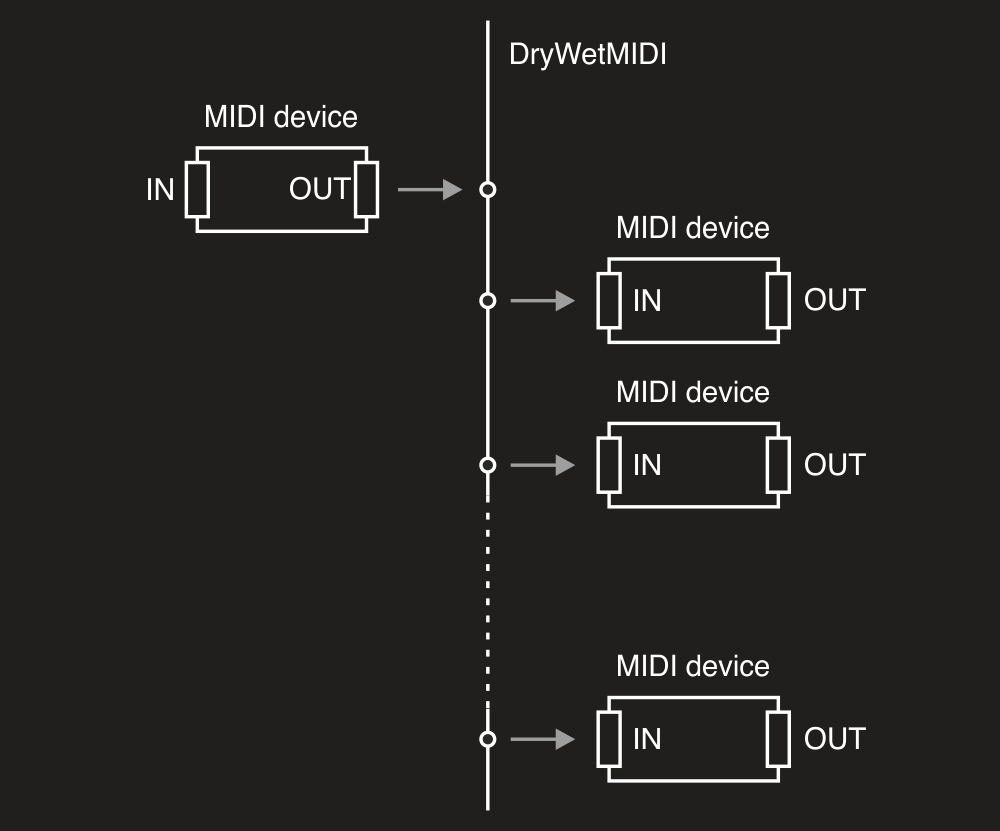
Following small example shows basic usage of EndpointsConnector:
using Melanchall.DryWetMidi.Multimedia;

// ...

using (var inputEndpoint = InputEndpoint.GetByName("MIDI In"))
using (var outputEndpoint1 = OutputEndpoint.GetByName("MIDI Out 1"))
using (var outputEndpoint2 = OutputEndpoint.GetByName("MIDI Out 2"))
{
    var devicesConnector = new EndpointsConnector(inputEndpoint, outputEndpoint1, outputEndpoint2);
    devicesConnector.Connect();
}
So if a MIDI event is received by MIDI In device, the event will be sent to both MIDI Out 1 and MIDI Out 2.
Don't forget to call StartEventsListening on input device to make sure EventReceived will be fired and MIDI event redirected to output devices. Read more in the Input endpoint article.